2026 comparison
The best virtual Advent calendar makers in 2026, compared honestly
Updated · by Milad, founder of Ouvella
A virtual Advent calendar is a link you send before December 1: every morning, one more door unlocks on a note, a photo, a voice message or a video. We went through eleven online Advent calendar makers, free and paid, using only what their own websites say: what fits behind a door, when it unlocks, who needs an account, and what it costs. The short version: for free, start with AdventMyFriend, MyAdvent or Unveil; for a classroom, Genially; for a company or a marketing campaign, Advent Calendar Maker, Türchen, PollUnit or Drimify; for something to print, Canva.
Full disclosure: Ouvella is our product. Our surprise calendar is on the list (number 4) with its limits, and it is not free. Everything said about the other makers comes from their own pages, read on November 1, 2026 (on November 2, 2026 for the three makers added that day), and each one gets an honest “best for”. No affiliate links, and nobody paid to be here.
Quick picks: which maker for which need?
- Free, no sign-up, 24 doorsAdventMyFriend
- Free, with short voice notesMyAdvent
- Free photos and words for up to 31 daysUnveil
- AI help, quizzes and gift vouchersDailyReveal
- Someone far away, your voice, midnight their timeOuvella (ours, paid)
- A classroomGenially
- A company or team calendar, ready-madeAdvent Calendar Maker, Türchen or MyAdvent for business
- A daily giveaway with sign-ups and prize drawsPollUnit
- A game a day for a brand campaignDrimify
- Print and assemble at homeCanva
The eleven makers side by side
| Maker | Free? | Paid option | Doors | Your voice | Video | Unlocks daily by itself | Privacy | Account to create |
|---|---|---|---|---|---|---|---|---|
| Unveil | Yes, up to 31 days (photos, text) | Premium: $9.99 per calendar | 1 to 31 | With Premium | With Premium (upload or link) | Yes, at midnight (time zone not stated) | Password with Premium | Yes |
| MyAdvent | Yes | Pro €5.99 or Pro+ €11.99, valid 3 months | Up to 90 days | 20 s (10 min with Pro) | YouTube; uploads with Pro | Not stated | Password with Pro | No, per the site |
| AdventMyFriend | Yes, entirely | None | 24 by default (1 to 31 per its FAQ) | Not mentioned | YouTube | Yes, on its date (time not stated) | Private or public; optional viewer password | No (an email address) |
| Ouvella (ours) | No (free to create and preview) | €14.99 per calendar (Ouvella price as of October 25, 2026) | 3 to 31 | Yes, recorded in the browser | Link (YouTube plays inside) | Yes, at midnight in their time zone | Private link; locked doors never sent | No |
| DailyReveal | 2 free 7-door calendars | €3.90 to €12.90 per calendar | 7 to 50 | Yes (Personal plan) | Yes (Personal plan) | Yes, at midnight (local time) | Password from Personal | Yes |
| Türchen | Yes, with ads | €5 or €30; business from €295 + VAT | Your own period | Not mentioned | Yes | Not stated | Not stated | Not stated |
| Genially | Yes (free plan) | Pro: €6 a month (annual) | Per template | Audio | Yes | Not mentioned | Private sharing with Pro | Yes |
| Advent Calendar Maker | Yes, for personal use (1 calendar) | Business: $199 or $1,299 a year | 24 (custom range with Premium) | Audio uploads (paid plans) | YouTube, Vimeo; uploads on paid plans | Yes, by date (time not stated) | Password with Enterprise | Yes |
| PollUnit | Yes, up to 40 participants | €4 to €37 a month (yearly) or €9 to €86 monthly | One a day | Not mentioned | Not mentioned | One a day (time not stated) | Not stated | No (free features) |
| Drimify | Yes, 100 participations a month | From $220 a month + VAT | Dec 1 to 24 or 25 | Not mentioned | Video content | One step a day (time not stated) | Password per step | Yes |
| Canva | Yes | Premium images | Up to you | No (printed) | No (printed) | No, it is printed | Not applicable | Yes |
Facts taken on November 1, 2026 from each maker’s official pages (Advent Calendar Maker, PollUnit and Drimify on November 2, 2026; full list at the bottom). “Not stated” means the maker’s page does not say. Prices and plans change: check their site before you choose. Brand names belong to their owners, none of them affiliated with Ouvella.
Makers for a gift to one person
Maker 1: Unveil
Built as a gift from the ground up: a countdown to the date you pick (Christmas, a birthday, a reunion), filled with photos and words, plus letters, your voice and videos on the paid tier, in one of nine visual themes.
- Price
- Free for up to 31 days of photos and text, no credit card, as many calendars as you like. The Premium upgrade is $9.99 once per calendar (adjusted by country): 13 formats including voice, video, playlists and scratch cards, every visual theme, and a password.
- Doors
- 1 to 31 days.
- Behind a door
- Photos and text for free. With Premium: a voice note recorded on the site, an uploaded video or a link (YouTube, TikTok, Instagram, Vimeo), a Spotify playlist, a puzzle, a question, a polaroid and more.
- Unlocks
- “Every day at midnight”, automatically. The page does not say which time zone.
- Languages
- English, French, German, Italian.
- Account
- You sign up to create one. The person receiving it needs no account.
Best for: a free countdown made of photos and words, or a beautifully finished one, with your voice and videos, through Premium.
Good to know: Voice notes and video are part of the paid upgrade.
Maker 2: MyAdvent
A German-made online Advent calendar maker: fill each door with photos, text, voice messages or YouTube videos, then send the link. There are also iPhone and Android apps.
- Price
- Free tier (€0). Pro (€5.99), valid for 3 months, adds a password, Spotify, Apple Music and Deezer, your own audio and video uploads, voice messages up to 10 minutes, and removes the promotions shown on the calendar. Pro+ (€11.99, also 3 months) adds voice messages up to 60 minutes and larger uploads. One-time payment per calendar, no subscription; the site says prices may vary by country and app store.
- Doors
- Your own start and end dates, up to 90 days.
- Behind a door
- Photos, text, voice messages up to 20 seconds, YouTube videos, AI-written text and AI images.
- Unlocks
- Not stated on the homepage.
- Languages
- English and German.
- Account
- “No account needed”, says the homepage.
- For business
- MyAdvent for business: Starters €299 and Professional €649, plus VAT; Expert on request.
Best for: a free calendar that can run longer than 24 days, with short voice notes and YouTube videos.
Good to know: On the free tier, voice notes stop at 20 seconds and video goes through YouTube.
Maker 3: AdventMyFriend
The simplest maker here: 24 doors for December by default, filled with images, text, GIFs, YouTube videos and links. Completely free, no sign-up.
- Price
- “Completely free,” says its homepage, with no paid tier.
- Doors
- 24 by default, one for each day of December. Its French and German FAQs say you choose 1 to 31 doors and the day of the last one.
- Behind a door
- Images, text, GIFs, YouTube videos, links. Voice messages are not mentioned.
- Unlocks
- A door opens on its date. The time and time zone are not stated.
- Languages
- English, French, German.
- Account
- No sign-up: your email address is used once, to send you a secret link to edit or delete the calendar. Recipients need no account. Keep it private or share it publicly; its French and German FAQs add an optional viewer password.
Best for: a quick, free calendar for friends, family or a team, with GIFs and videos.
Good to know: Made for the 24 days of December, without voice notes or video uploads.
Maker 4: Ouvella, the surprise calendar
This is our productouvella.com
Our surprise calendar: an Advent calendar with 24 doors (December 1 to 24) or a countdown of 3 to 31 doors to any date you choose. Behind each door: a title, a message, a photo, your voice or a song, and a link.
- Price
- €14.99 once per calendar, however many doors. No free tier: creating it and the preview are free, you pay to get the link to send.
- Doors
- 3 to 31. Advent: 24 doors, December 1 to 24.
- Behind a door
- A title, a message of up to 1,200 characters, one photo (an animated GIF under 6 MB works too), one audio clip (your voice recorded in the browser, or an mp3 or m4a file) and one link: YouTube and Spotify play inside the door. No video uploads.
- Unlocks
- At midnight in the recipient’s time zone: you choose where they live. A locked door’s contents are never sent to their phone.
- Languages
- 6: English, French, Spanish, German, Italian, Brazilian Portuguese.
- Account
- None, for you or for them. Private link and QR code.
- After you pay
- You can keep filling doors until the day before, with an email reminder if one is still empty.
- Notification
- They can ask for an email each morning a door opens (it never gives the door away), and stop it in one click.
Choose it if: you are making it for one person who matters, especially far away (every door opens at midnight their time), and you want your voice in it without a subscription.
Good to know: Paid, no free tier. One calendar is for one person (one time zone). No quizzes, scratch cards or video uploads behind the doors.
Create my calendar (€14.99)Free to create and preview · you pay to get the link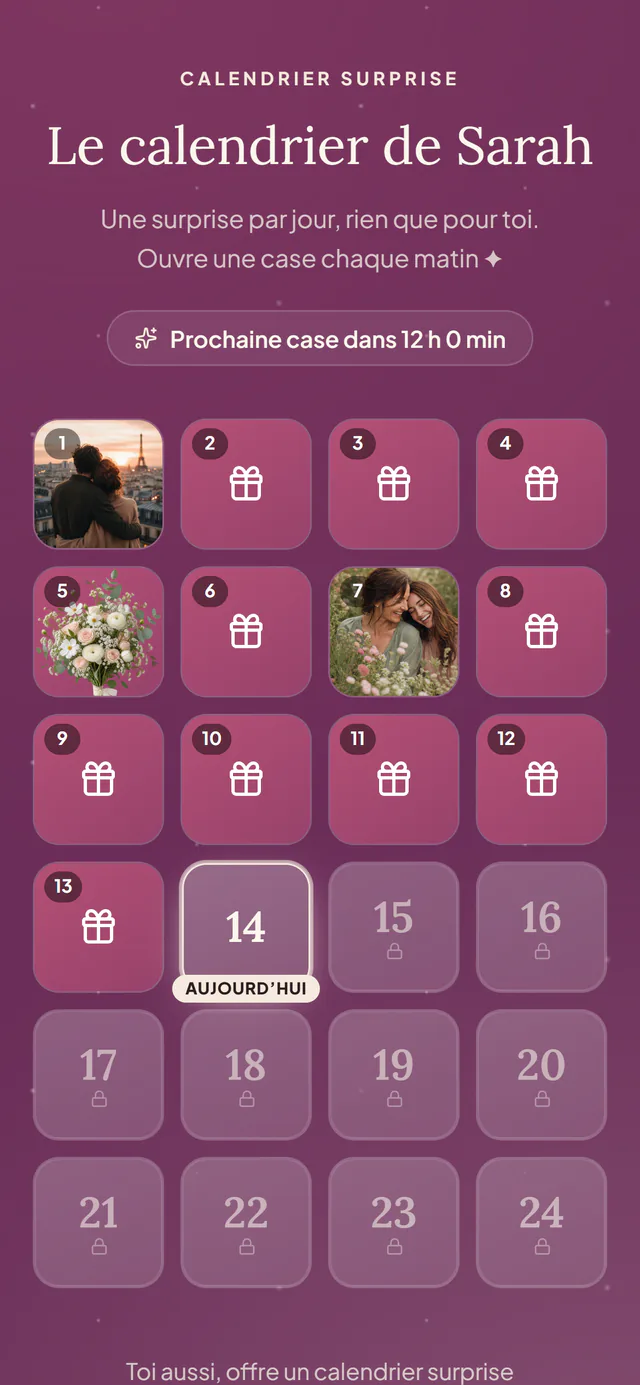
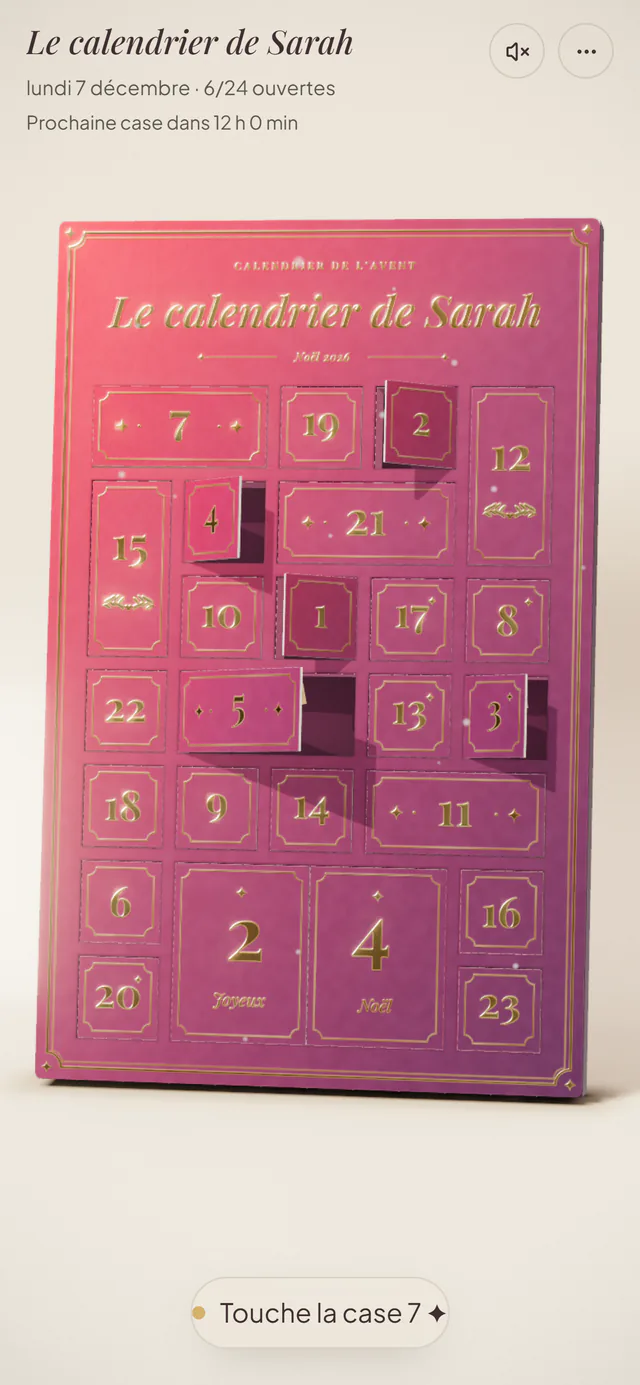
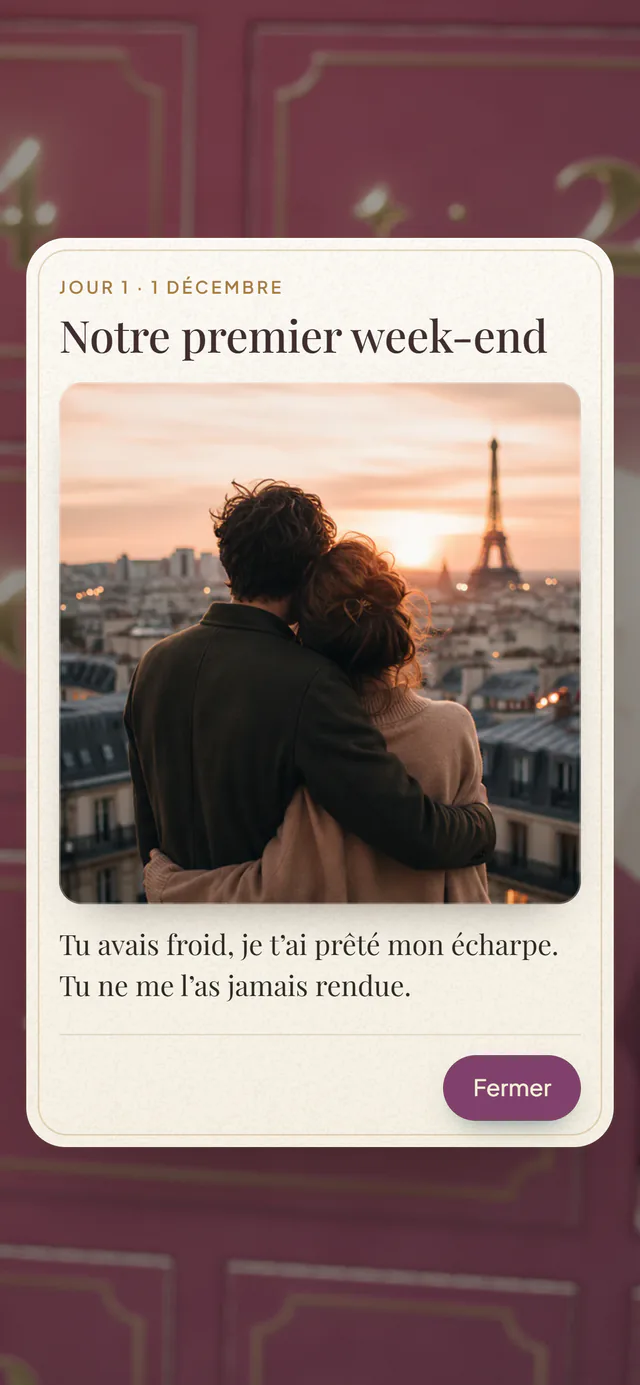
Real screenshots of an Ouvella surprise calendar, as the recipient sees it on their phone (an example in French, with a made-up name). Maker 5: DailyReveal
An Advent calendar and countdown maker with built-in AI (Google Gemini) that can draft the surprises from a theme and an audience. Aimed at families as much as at company campaigns.
- Price
- One-off payment per calendar, no subscription: Discovery €3.90 (7 doors), Personal €5.90 (25 doors), Premium €12.90 (50 doors). These are the prices shown in euros (the page also offers USD and GBP). Two free Discovery calendars and 3 AI credits when you sign up.
- Doors
- Up to 7, 25 or 50 depending on the plan, over the number of days you choose.
- Behind a door
- Photos, videos (uploaded or YouTube), voice notes, quizzes, gift vouchers, links. Photos, videos, audio and links are listed under the Personal plan.
- Unlocks
- Future doors are locked; each one opens “on its scheduled day at midnight (local time)”.
- Limits
- Total views: 50 (Discovery), 150 (Personal), 2,000 (Premium). Validity: 30 days, 3 months after the end, or 1 year depending on the plan.
- Languages
- Site in 10 languages, English included.
- Account
- Required to create. The recipient opens a link in the browser, or in the Android or Windows app.
Best for: getting help from AI to write the doors, or adding quizzes and gift vouchers.
Good to know: Check how many views and how long each plan includes.
Makers for a classroom, a team or a brand
Maker 6: Türchen
A German digital Advent calendar platform built mainly for companies, with plans for private users too. Its specialty: mini games (quiz, memory, puzzle) behind the doors.
- Price (personal)
- Basic is free (one calendar for 6 months, 50 MB), Ad-Free costs €5, Pro €30 with games and 250 MB.
- Price (business)
- €295 (Business) to €2,250 (Enterprise) plus VAT per calendar, with a 10-day free trial.
- Doors
- You choose the calendar period and the order of the doors.
- Behind a door
- Text, photos, videos, embedded external content; games with Pro or as an add-on.
- Unlocks
- Not stated on the page.
- Languages
- Site in English and German.
Best for: games behind the doors, and companies that want a branded calendar embedded on their own website.
Good to know: The free plan shows ads in the calendar (€5 removes them).
Maker 7: Genially
An interactive content platform (presentations, quizzes, lessons) with several Advent calendar templates, one of them made for classrooms: click a door and a window pops up with a surprise, a video or an activity for students to discover day by day.
- Price
- Free plan (€0) with 1,000+ free templates and resources. Pro is €6 a month, billed annually (prices as shown to us in euros), for private sharing kept out of search engines, and downloads.
- Doors
- Depends on the template; everything is editable.
- Behind a door
- Text, images, audio, video, animations.
- Unlocks
- The template pages do not mention doors that stay locked until their date.
- Languages
- Site in English and five other languages.
- Account
- The “Use this template” button leads to a sign-up page.
Best for: a classroom, or an interactive presentation where everyone opens the door of the day together.
Good to know: It is a design tool: you build every door yourself.
Maker 8: Advent Calendar Maker
A dedicated online Advent calendar maker with 100+ designs, built around companies, teams, customers, classrooms and marketing campaigns: its paid plans “are designed for businesses and organizations”, and personal use is free.
- Price
- Free for personal use: one calendar with text and YouTube or Vimeo videos. For businesses: Premium $199 a year (unlimited calendars, photo and video uploads, coupon codes, your branding, analytics) and Enterprise $1,299 a year (password-protected calendars, data export, white label). Prices as shown to us, in US dollars.
- Doors
- 24; a custom date range with Premium.
- Behind a door
- Free: text and YouTube or Vimeo videos. On the paid plans: photos (2 MB each), your own MP4 videos (20 MB), link buttons, discount codes, quizzes, polls, downloads, and uploaded audio or Spotify and SoundCloud embeds.
- Unlocks
- “Doors unlock automatically based on the date.” The time and time zone are not stated; custom opening times come with Premium.
- Languages
- English, German and Danish.
- Account
- Yes, a free account.
Best for: a company, a team or a classroom that wants a ready-made calendar with its own branding, discount codes and analytics, or a quick free calendar of text and videos.
Good to know: The free plan is one personal calendar of text and YouTube or Vimeo videos; photos and uploads are on the business plans.
Maker 9: PollUnit
A poll, survey and contest platform with an Advent (or event) calendar: one door a day with text and photos, and a participation form people can fill in every day, with daily winner draws. Its features center on giveaways (daily sign-ups, winner draws, data export), though its page also mentions friends and family.
- Price
- Free plan (€0): up to 40 participants per calendar. Premium €9 a month (€4 a month paid yearly; 200 participants, custom door graphics), Business €29 (€12 yearly; 2,000 participants, winner draws), Enterprise €86 (€37 yearly). Each plan is sold as a subscription or a one-time purchase.
- Doors
- One per day; it also works as an event calendar outside Advent.
- Behind a door
- Text and photos, plus a participation form you design (wishes, stories, contact details).
- Unlocks
- One door a day; the opening time is not stated.
- Languages
- Site in 24 languages, English included.
- Account
- Not needed for the free features, per its pricing page.
Best for: a team or community calendar with a daily sign-up form and prize draws.
Good to know: A poll and contest tool first: the free plan stops at 40 participants per calendar, and winner draws need the Business plan.
Maker 10: Drimify
A gamification platform for marketing, events, HR and training. Its Advent calendar turns each day of December into a game, a quiz or a piece of content, with data collection forms and a leaderboard: a tool for brands to engage an audience.
- Price
- A free plan (100 participations a month, data kept 90 days). Paid plans from $220 a month (Starter) to $778 (Growth), excluding VAT, or custom pricing; shown in US dollars by default (€197 and €697 in euros).
- Doors
- December 1 to 24 or 25, one step a day; calendar, grid or path layouts.
- Behind a door
- Games from its catalogue (quizzes, arcade games, scratch cards, a wheel of fortune), or video, image or text content.
- Unlocks
- One step a day; the opening time is not stated. Any step can be locked with a password.
- Languages
- Site in English, French, German, Spanish, Portuguese and Italian; multilingual calendars are a premium feature.
- Account
- Yes, a free sign-up.
Best for: a brand campaign with a game a day, lead collection and a leaderboard.
Good to know: Built for marketing campaigns: paid plans start at $220 a month, excluding VAT.
For a printable calendar
Maker 11: Canva
The design platform has Advent calendar templates among its printable Christmas calendars: add your photos, then print it or share it as an image. A starting point for a homemade calendar rather than one whose doors open by themselves.
- Price
- Free templates; some premium images and elements cost a small fee per use.
- Doors
- Up to you: you design the layout.
- Behind a door
- Your photos, illustrations and text, on a printable design.
- Unlocks
- No door-by-door opening: you download a print-ready PDF or an image, or share the design.
- Account
- Yes, a free Canva account.
Best for: a homemade, printed Advent calendar with a small treat behind every door.
Good to know: You still need to print and assemble it (boxes, envelopes, pockets).
Free virtual Advent calendars: what you actually get
You can absolutely make a personalized virtual Advent calendar for free. Here is what each free option includes, according to the makers themselves:
- AdventMyFriend: everything is free. 24 doors by default, images, GIFs, YouTube videos and links, no sign-up.
- MyAdvent: photos, text, 20-second voice messages and YouTube videos, over a period you set, up to 90 days.
- Unveil: up to 31 days of photos and text, with an account. Voice and video need the $9.99 Premium upgrade.
- Advent Calendar Maker: one personal calendar of 24 doors with text and YouTube or Vimeo videos, with a free account. Photos are on its business plans.
- Türchen: one calendar for 6 months, with ads shown in the calendar.
- DailyReveal: two small 7-door calendars when you sign up, to try it out.
Ouvella has no free tier, and we would rather say so plainly: you can build the whole calendar and watch the preview without paying, then it is €14.99 once to get the link.
A virtual Advent calendar for adults
Advent calendars usually mean chocolate and kids’ crafts. A calendar for a partner, a best friend or a sibling is a different thing: twenty-four reasons you love them, the photo from your first trip, a voice note they can replay on a bad day, a voucher for the dinner you keep postponing. Three things matter more here than templates:
- Privacy. A password is available with Unveil’s Premium, DailyReveal’s Personal plan and MyAdvent Pro; AdventMyFriend lets you keep a calendar private. Ouvella works with a private link, and a locked door’s contents never reach the phone before its day.
- Your voice. Hearing you matters more than any design. MyAdvent (20 seconds free), Unveil (Premium), DailyReveal and Ouvella all take voice notes.
- Their time zone. If you are apart, a door that opens at your midnight can land at 6 p.m. the day before for them. See the next section.
Short on ideas for the doors? Our list of Advent calendar ideas for adults works with any of these makers. Making one for your partner? Our page on a virtual Advent calendar for your girlfriend has 24 door ideas for a couple.
Long distance? Check when the doors unlock
Here is what each maker says about the time a door opens:
- Unveil: “every day at midnight”, time zone not stated.
- DailyReveal: “at midnight (local time)”.
- AdventMyFriend: a door opens on its date, time not stated.
- Advent Calendar Maker: doors “unlock automatically based on the date”, time not stated (custom opening times with Premium).
- MyAdvent, Türchen, PollUnit and Drimify: not stated on their pages.
- Ouvella: midnight in the recipient’s time zone, which you set when you create the calendar.
That is exactly why we built ours that way, for couples a few time zones apart. Door ideas for that situation are on our long distance Advent calendar page.
How to make a virtual Advent calendar in 5 steps
1. Pick the end date and the number of doors
Twenty-four doors from December 1 to 24, or fewer if you start late. Unveil, MyAdvent, DailyReveal and Ouvella can also count down to another date.
2. List your 24 ideas before you open the editor
A memory, a photo, a song, a small dare, a voucher for time together. Mix the formats so every morning feels different, and save the best for the last door.
3. Fill the doors
Photos, words, your voice or videos, depending on the maker. You do not have to finish in one evening if the maker lets you keep editing after you share it (Unveil, DailyReveal and Ouvella all say they do).
4. Check when the doors unlock
If they live in another country, find out which time zone the doors follow (more on that below).
5. Send the link
By text, by email, or as a QR code tucked inside a card. Then let it do its work, one door at a time.
What a good online Advent calendar maker should offer
Whichever maker you choose, a virtual Advent calendar lives or dies on a few practical details. Check these eight before you start filling doors; the comparison table above answers most of them for each maker.
1. Doors that stay locked until their day
The whole point is one surprise a day. Check that a door can’t be opened early, and for a personal calendar, that its contents can’t be seen ahead of time.
2. A clear unlock time, in the right time zone
Midnight, but whose? If you live in different time zones, the maker should say which clock the doors follow.
3. The formats you actually want
Text and photos are standard; your voice, video uploads, music links and GIFs are not. List your door ideas first, then pick the maker that takes them.
4. Editing after you share
Few people finish 24 doors in one evening. A maker that lets you keep filling doors after the link is sent takes the pressure off.
5. Nothing to install on their side
A link that opens in any browser beats an app they have to download. Check whether they need an account to open it.
6. Privacy that fits the content
Love notes are not a classroom calendar: look for a private link, a password, or a way to keep the calendar out of search engines.
7. A price you understand
Free tier, one-off payment, a few months of a paid plan, view limits, validity periods: read what the price covers, and how long the calendar stays online.
8. A good look on a phone
That’s where it will most likely be opened, first thing in the morning. Open the preview on your own phone before you send the link.
Virtual, printable or homemade: which Advent calendar?
- Virtual (online). A link you send once, with doors meant to open one day at a time (the table above shows how each maker handles unlocking). Nothing is shipped, so it works at any distance, and depending on the maker a door can hold a voice note, a video or a song.
- Printable. A design you make online and print at home, like the Canva templates above. You assemble and fill it yourself; the doors don’t lock.
- Homemade. Envelopes, matchboxes, paper bags on a string, filled with small things. Full control, but it has to be ready, and delivered, before December 1.
The two go well together: a paper calendar at home, a virtual one when you are apart. Whatever the format, the doors are what people remember, and our free Advent calendar ideas for adults give you 24 that cost nothing, plus ideas that only work online.
Ouvella or another maker?
Choose Ouvella if…
- it is for one person who matters to you
- they live far away and every door should open at midnight their time
- you want to record your voice right in the browser, no app
- you want a countdown to a date other than Christmas (3 to 31 doors)
- you want to fill the doors as December goes, with a reminder the day before
- you want them to be able to get an email each morning a door opens
Choose another maker if…
- you want it free (AdventMyFriend, MyAdvent, Unveil)
- you want video uploads (Unveil, MyAdvent Pro, DailyReveal)
- you want quizzes, games or vouchers (DailyReveal, Türchen)
- it is for a classroom (Genially) or a company (Advent Calendar Maker, Türchen, MyAdvent for business)
- you want a daily giveaway with prize draws (PollUnit) or a game a day for your brand (Drimify)
- you want a paper calendar (Canva)
Everything about our calendar, with 24 door ideas, is on the virtual Advent calendar page. Outside December, the same idea works as a countdown calendar to a reunion or a birthday.
How we made this list
- We looked for makers that let you build an Advent calendar online, starting from what people search for (“virtual advent calendar maker”, “free”, “for adults”) and from the tools that specialist sites and teachers’ blogs keep citing. On November 2, 2026 we added Advent Calendar Maker, PollUnit and Drimify, which Google’s AI Overview names in the US for “online advent calendar maker”: two are built for businesses and marketing (Advent Calendar Maker, Drimify), and PollUnit is a poll and contest tool.
- We read each maker’s official pages on November 1, 2026 (November 2, 2026 for the three added that day): homepage, pricing, FAQ. Every fact comes from those pages. When a page does not say something, we do not guess: we write “not stated”.
- The same criteria for everyone: free tier, price, number of doors, voice, video, automatic unlocking and its time, privacy, account.
- We kept only makers that work in November 2026, and left out templates where you reveal each door by hand, and tools whose pages did not let us check the basics.
- Ouvella is ours: it is on the list with its limits, not ranked first. No affiliate links, and nobody paid to be included.
- Spotted a mistake or a price change? Write to contact@ouvella.com and we will fix it.
Frequently asked questions
Is there a free virtual Advent calendar?
Yes, several. As of November 2026, AdventMyFriend is entirely free (24 doors by default, no sign-up). MyAdvent has a free tier with photos, text, 20-second voice messages and YouTube videos. Unveil is free for up to 31 days of photos and text. Advent Calendar Maker is free for one personal calendar of text and YouTube or Vimeo videos. Türchen has a free plan with ads. Genially and Canva are free too, but one is built for classrooms and the other for printing, and PollUnit and Drimify have free plans for small giveaways and campaigns. Ouvella, our product, is not free: €14.99 once per calendar.
What is the best virtual Advent calendar maker?
It depends on what you want behind the doors. Free and quick: AdventMyFriend. Free with your voice: MyAdvent (20 seconds). A polished gift: Unveil (Premium, $9.99) or Ouvella (€14.99, our product). AI help and quizzes: DailyReveal. A classroom: Genially. A company: Türchen or Advent Calendar Maker. A daily giveaway with prize draws: PollUnit. A game a day for a brand: Drimify.
How do I make a virtual Advent calendar?
Pick a maker, then the end date and the number of doors (24 for Advent). Fill each door with a note, a photo, your voice or a video, depending on what the maker allows, check when the doors unlock if they live far away, then send them the link. With most of these makers, the recipient does not need an account to open it.
Is there a virtual Advent calendar for adults?
All of these makers work for adults: what makes a calendar grown-up is what you put behind the doors (memories, inside jokes, a love letter, a voucher for a night out). If it is personal, look at privacy: Unveil (with Premium), DailyReveal (from the Personal plan) and MyAdvent (Pro) offer a password, AdventMyFriend lets you keep a calendar private, and Ouvella shares a private link and never sends a locked door’s contents to the phone ahead of time.
Can I add voice messages or videos to a virtual Advent calendar?
Yes, with several makers. Your voice: MyAdvent (20 seconds free, 10 minutes with Pro), Unveil (with Premium), DailyReveal (Personal plan) and Ouvella (recorded right in the browser). Uploaded videos: Unveil (Premium), MyAdvent (Pro) and DailyReveal. YouTube videos: AdventMyFriend, MyAdvent’s free tier, Advent Calendar Maker’s free plan (YouTube or Vimeo, with MP4 uploads on its paid plans), and Ouvella, where a video is added by its link (no video file uploads).
What time do the doors of a virtual Advent calendar open?
Usually at midnight, but whose midnight? Unveil says “every day at midnight” without naming a time zone, DailyReveal says “at midnight (local time)”. Ouvella opens each door at midnight in the recipient’s time zone, which you set when you create the calendar. For a long-distance relationship, that is the detail to check.
Do I need an account to make a virtual Advent calendar?
Not always. No account: AdventMyFriend (an email address is enough), MyAdvent (“No account needed”, per its homepage), PollUnit for its free features, and Ouvella. An account: Unveil, DailyReveal, Genially, Canva, Advent Calendar Maker and Drimify. In every case, the person receiving the calendar opens it with a plain link.
Can I make an online Advent calendar for a classroom or a business?
Yes. For a classroom, Genially’s Advent calendar templates are designed for students to discover an activity a day, and Advent Calendar Maker has a classroom use case too. For a business, Türchen (€295 to €2,250 plus VAT per calendar) and MyAdvent for business (€299 or €649 plus VAT, Expert on request) offer games, logos, website embedding and analytics; Advent Calendar Maker ($199 or $1,299 a year) adds discount codes, your branding and analytics; Drimify (from $220 a month plus VAT) turns each day into a game with lead collection; PollUnit (from €4 a month paid yearly) adds a daily sign-up form and prize draws. Ouvella is built for giving a calendar to one person.
What should a good online Advent calendar maker offer?
Doors that stay locked until their day, a clear unlock time in the right time zone, the formats you want behind the doors (voice, video, music, links), the option to keep editing after you share the link, nothing to install for the person receiving it, privacy that fits the content (a private link or a password), a price you understand, including how long the calendar stays online, and a design that works on a phone.
What is the difference between a virtual and a printable Advent calendar?
A virtual Advent calendar is a link whose doors open one day at a time: nothing is shipped, and depending on the maker a door can hold a voice note, a video or a song. A printable one is a design you print and assemble at home, then fill with small things; its doors don’t lock. The two go well together: a paper calendar at home, a virtual one when you are apart.
Sources
Official pages read on November 1, 2026 (Advent Calendar Maker, PollUnit and Drimify on November 2, 2026). For Ouvella: our virtual Advent calendar page.
- Unveil: unveil.day/, unveil.day/how-it-works, unveil.day/all-the-formats
- MyAdvent: www.myadvent.net/en/, www.myadvent.net/business/en
- AdventMyFriend: adventmyfriend.com/, adventmyfriend.com/ideas/how-to-make-a-digital-advent-calendar/, adventmyfriend.com/fr/
- DailyReveal: dailyreveal.app/en, dailyreveal.app/en/pricing
- Türchen: tuerchen.com/en/start/private, tuerchen.com/en/pricing-features
- Genially: genially.com/template/online-advent-calendar/, genially.com/template/advent-calendar-post/, genially.com/plans/
- Advent Calendar Maker: adventcalendarmaker.com/
- PollUnit: pollunit.com/en, pollunit.com/en/advent-calendar, pollunit.com/en/accounts
- Drimify: drimify.com/, drimify.com/en/apps/advent-calendar/, drimify.com/en/pricing/
- Canva: www.canva.com/calendars/templates/christmas/, www.canva.com/create/calendars/, www.canva.com/fr_fr/creer/calendriers/avent/